
COMING SOON
Wiring Sim
Electrical circuit simulator online
Find the fault. Understand the circuit.
Practice 24 V DC circuit troubleshooting and multimeter measurements.
From schematic to working circuit - in your browser.
Administrator preview only · Sign in with your ControlByte account
How does this electrical circuit simulator work?
Multimeter practice on 24 V DC circuits
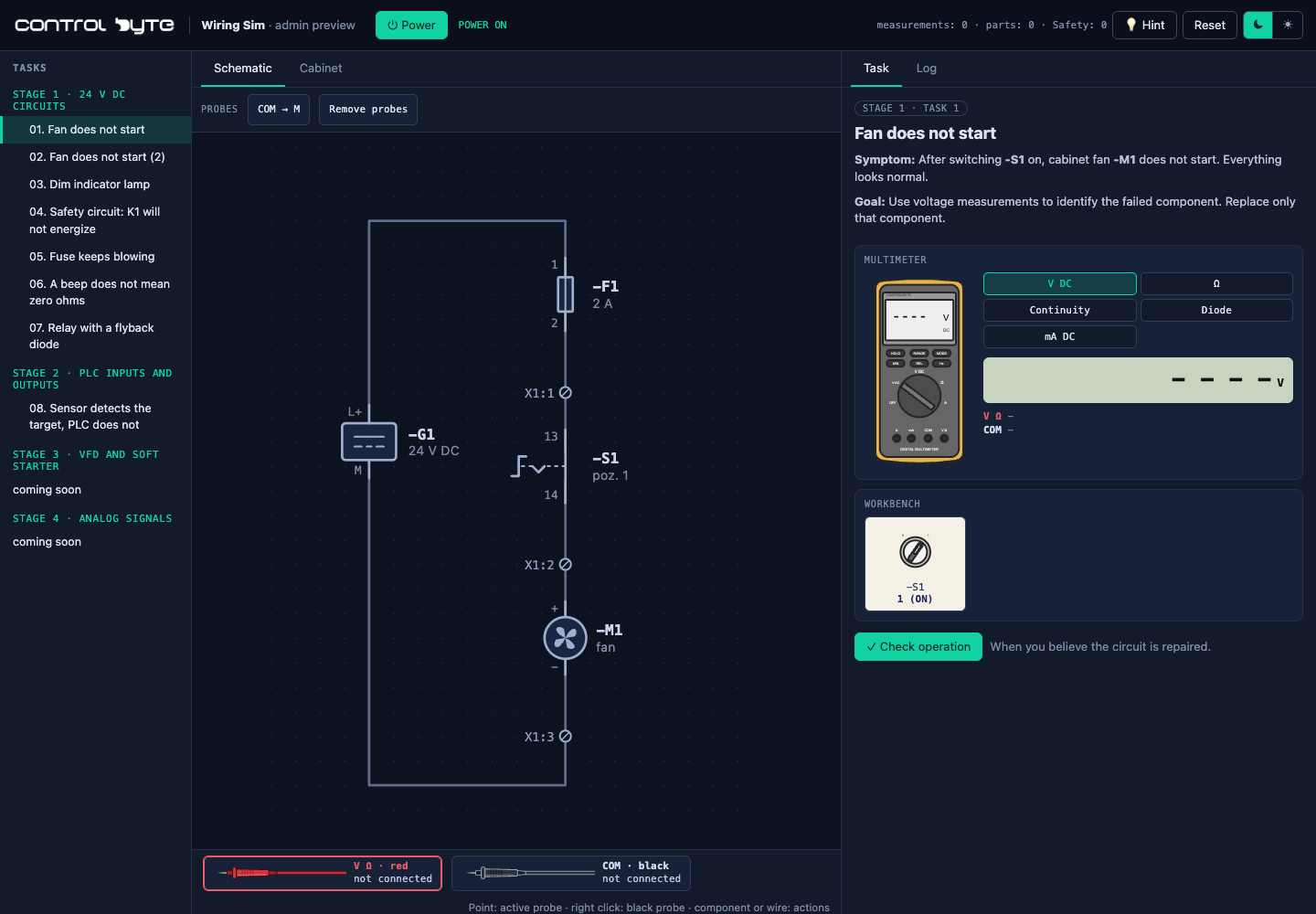
Wiring Sim is being developed for troubleshooting predefined control circuits. Choose a fault scenario, select a meter mode and place probes on terminals. Compare voltage, resistance and continuity readings to locate the cause.
It provides measurement exercises on prepared schematics, rather than a free-form electronic circuit design editor.
Open circuits, shorts and PLC input wiring
The first eight scenarios include a broken wire, loose terminal, repeatedly blown fuse, flyback diode and PNP sensor circuit. Switch off power before repairs, then check circuit operation.
The public version is coming soon; administrators can access the preview. To practice programming now, explore the Virtual PLC Simulator.
FROM MEASUREMENT TO ROOT CAUSE
Don’t guess.
Measure and verify.
Choose a fault scenario. Compare measurements with symptoms, find the cause and verify circuit operation after the repair.
01 / FROM SCHEMATIC TO MEASUREMENT
Place the probes.
Find the cause.
Check voltage, resistance and continuity. Select a multimeter mode and place the probes on schematic terminals.
Distinguish a failed component from a broken wire. Switch off power before repairs, then run the functional check.
Open administrator preview ↗02 / TROUBLESHOOTING SCENARIOS
Small circuits.
Real diagnostic thinking.
Eight scenarios in the development version. Explore example tasks below.
Preview access is restricted to administrators.
Open circuit
Locate the interruption in the load supply.
Loose terminal
Compare measurements and inspect connections.
PNP sensor and PLC input
Trace the signal from the sensor to the PLC input.
Want to practice PLC programming?
Explore Virtual PLC Sim ↗Example: find an open wire in a 24 V DC load circuit
Follow the voltage, not a guess
Consider a supply, a fuse, a switch and a load connected in series. The switch is closed, but the load does not operate. Start by checking the supply voltage between +24 V and 0 V. Then compare points along the supply path against the same 0 V reference.
If supply voltage is present before a connection but absent after it, investigate that part of the circuit. A voltage across an open connection can help locate the interruption. Interpret each reading using the schematic and the current switch state.
Verify the repair
In the virtual exercise, switch the supply off before repairing the fault or checking resistance and continuity. After the repair, restore power and confirm that the load responds to the switch. A single plausible meter reading is not enough: check the circuit's function too.
Wiring Sim uses prepared training circuits. It does not replace electrical safety training or a validated design tool. The interactive version currently requires administrator access; this example explains the diagnostic approach while public access is being prepared.
For an available hands-on exercise now, use the free online PLC simulator. ControlByte's automation learning roadmap explains how electrical basics and PLC programming fit together.
GOOD TO KNOW
Before
you start measuring.
How do I launch the Wiring Sim preview?
Click “Launch Wiring Sim” and sign in with a ControlByte administrator account. Regular user accounts cannot access the development version.
When will it launch?
The public version is in development. No launch date has been announced. The preview is available to ControlByte administrators.
Do I need a physical PLC?
No. The simulator is designed to run in your browser, with virtual circuits and a multimeter.
How is it different from Virtual PLC Sim?
Wiring Sim focuses on circuits, measurements and troubleshooting. Virtual PLC Sim lets you practice PLC programming.
ADMINISTRATOR PREVIEW
Find the fault.
Restore operation.
Launch Wiring Sim Administrator preview only · Sign in with your ControlByte account