
What you will build
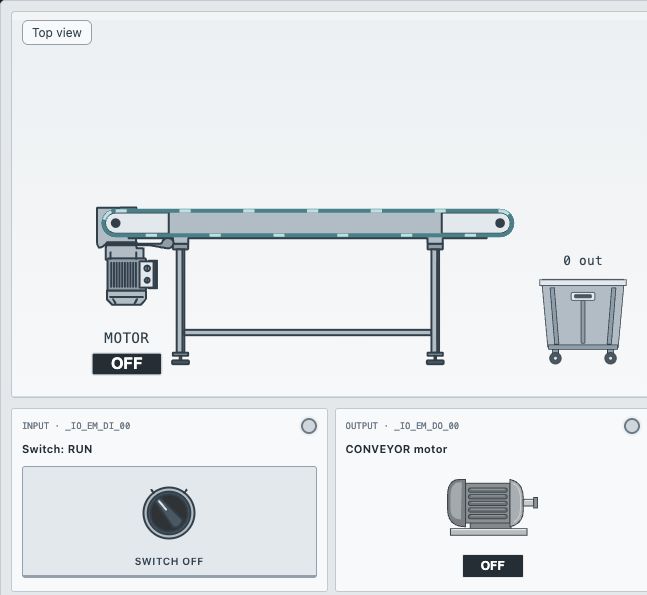
A conveyor should move while its RUN selector is on and stop when it is off. No memory or timer is needed. This is the simplest useful ladder program: one input controls one output. The selector keeps its position after you click it; it is not a momentary START button.
Read the signals first
| Tag | Meaning of TRUE | Role |
|---|---|---|
xSel_Run | Operator requests movement | Input |
xMotor_ConvRun | Conveyor motor is commanded on | Output |
The screenshot uses the Micro850 profile, which displays addresses such as _IO_EM_DI_00. Other profiles can show different addresses. Select the existing tag by name instead of typing an address from another controller profile.
Build the first rung
- Open the linked exercise and select your editable Main ladder sheet.
- Insert a NO contact. Click its tag field and choose
xSel_Run. - Insert a normal COIL to the right and assign
xMotor_ConvRun. - Press the top-bar Run button to download and execute the program.
- Operate the RUN selector in the station panel. Watch the input value, output value and conveyor together.
--[ xSel_Run ]----------------( xMotor_ConvRun )--The rung reads left to right. A NO instruction passes a TRUE signal, so the coil receives the same Boolean result as the selector. This is signal assignment: MOTOR = RUN.
Test both states and CPU STOP
| CPU | RUN selector | Expected motor |
|---|---|---|
| RUN | OFF / FALSE | OFF |
| RUN | ON / TRUE | ON |
| STOP | ON / TRUE | OFF |
Boxes arrive automatically while the conveyor runs. Watch one travel along the belt; switch RUN off and confirm that movement stops. Then use Run all checks to verify the program on a fresh simulated CPU. That automated check is separate from simply watching the animation.
If nothing moves
- CPU still in STOP: changing the station switch does not start program execution.
- Wrong tag: a new memory variable with a similar name does not drive the conveyor output.
- NC instead of NO: the motor runs when the selector is off, reversing the intended condition.
- Editing the reference: the Solution sheet is read-only. Build and run your own Main sheet.
Before moving on, predict what happens if you replace NO with NC. The next tutorial explains that inversion. Export your work if you want a portable copy; browser storage alone is tied to your browser.
Put the explanation into practice
Free exercise - no account required.
Practice in simulator ↗Ready for the next step?
Continue with a guided introduction to ladder logic and the Siemens environment.
Free Siemens S7-1200 ladder logic course ↗
Looking for a broader path? Explore PLC Bootcamp or compare PLC courses by platform and level.
Check the selected offer for its syllabus, software requirements and simulator access conditions.