
A request is not enough
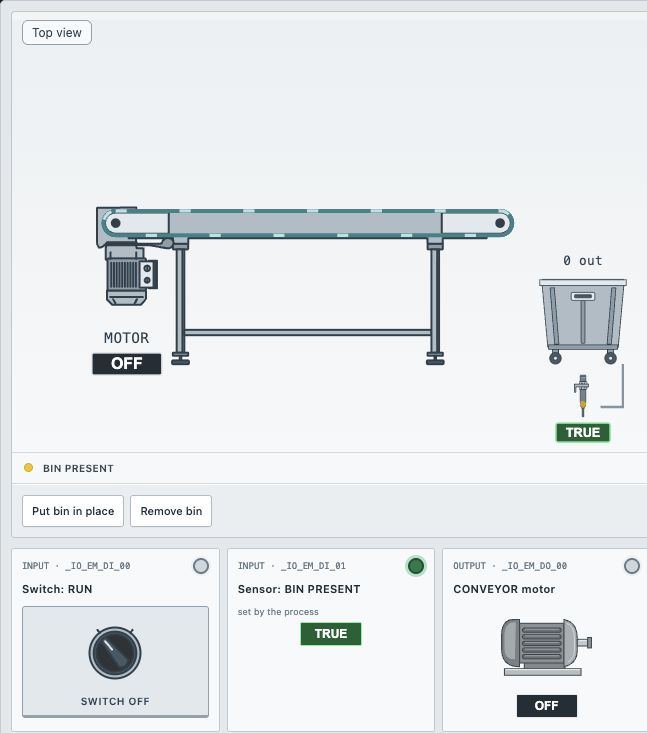
The operator selects RUN, but the conveyor should only move when its collection bin is in place. These are two independent inputs. RUN expresses the operator's request; BIN PRESENT permits that request to take effect. The motor needs both conditions at the same time.
Identify the input and output tags
| Tag | Meaning of TRUE |
|---|---|
xSel_Run | The maintained RUN selector is on |
xSensor_BinPresent | The metal collection bin is detected |
xMotor_ConvRun | The conveyor motor is commanded on |
The bin sensor is set by the scene. Use Put bin in place and Remove bin to change the physical condition, then read the resulting sensor value. This keeps the distinction between an operator control and a process measurement clear.
Put the conditions in series
- Open the exercise and select the Main ladder sheet.
- Add a NO contact assigned to
xSel_Run. - Add a second NO contact in series, assigned to
xSensor_BinPresent. - Finish the rung with a normal coil assigned to
xMotor_ConvRun. - Run the CPU and test the table below before using the automatic checks.
--[ xSel_Run ]--[ xSensor_BinPresent ]--( xMotor_ConvRun )--Series contacts represent AND. A FALSE condition anywhere in this path makes the rung result FALSE. Unlike parallel branches, this arrangement cannot let either input start the conveyor on its own.
Use all four input combinations
| RUN | BIN PRESENT | MOTOR = RUN AND BIN PRESENT |
|---|---|---|
| FALSE | FALSE | FALSE |
| FALSE | TRUE | FALSE |
| TRUE | FALSE | FALSE |
| TRUE | TRUE | TRUE |
Next, test a transition. With both inputs TRUE and the belt moving, remove the bin. The sensor and motor should turn off. Put the bin back while RUN remains selected: this educational model resumes movement. Finally switch RUN off while leaving the bin in place.
Automatic restart is part of this exercise's specification, not a general machine-safety rule. A real installation may require a deliberate restart, risk assessment and safety-rated equipment.
What to check when the result is wrong
- Parallel contacts: this produces OR and allows movement with only one condition satisfied.
- Inverted bin sensor: an NC instruction would permit operation when the bin is absent.
- Two coils for the same motor: separate rungs writing the same output can overwrite one another. Express this condition in one rung.
- Only testing both inputs on: an incorrect OR program also passes that single case. Test the three combinations that must remain off.
Run all checks when your manual observations agree with the table. The next step is memory: maintaining a run command after a momentary START button is released.
Put the explanation into practice
Free exercise - no account required.
Practice in simulator ↗Ready for the next step?
The screenshot uses the Micro850 profile. Explore the Micro800 course to learn the controller-specific engineering workflow.
Allen-Bradley Micro800 PLC programming course ↗
Looking for a broader path? Explore PLC Bootcamp or compare PLC courses by platform and level.
Check the selected offer for its syllabus, software requirements and simulator access conditions.