
What an on-delay timer does
A TON delays a TRUE output. When its input becomes TRUE, it starts accumulating elapsed time. Its output Q becomes TRUE only after the input has stayed TRUE for the full preset duration. If the input becomes FALSE before completion, the elapsed time resets; the next attempt starts again from zero.
| Timer field | Meaning |
|---|---|
| IN | Condition that enables timing |
| PT | Preset duration, such as T#5s |
| ET | Elapsed time while timing |
| Q | TRUE after the preset duration has elapsed with IN TRUE |
A timer instance needs a consistent name. Reading another instance's Q value will not show completion of the timer you actually enabled.
Try a delayed lamp before a conveyor
- Open the free sandbox and choose a maintained switch input and a lamp output.
- Add a TON enabled by that switch. Give the instance a name and set a short preset, for example
T#3s. - Use the timer's Q value as the condition for the lamp. The switch enables timing; it does not directly drive the lamp.
- Run the CPU. Turn the switch on and verify that the lamp stays off during the delay and comes on after the full interval.
- Switch off before the delay finishes, then switch on again. The lamp must wait for a new full interval.
Use the timer block editor for the name and preset. Available editor syntax depends on the chosen PLC profile; the sequence above describes the behavior rather than code to paste into a vendor project.
Apply the idea to exercise 22
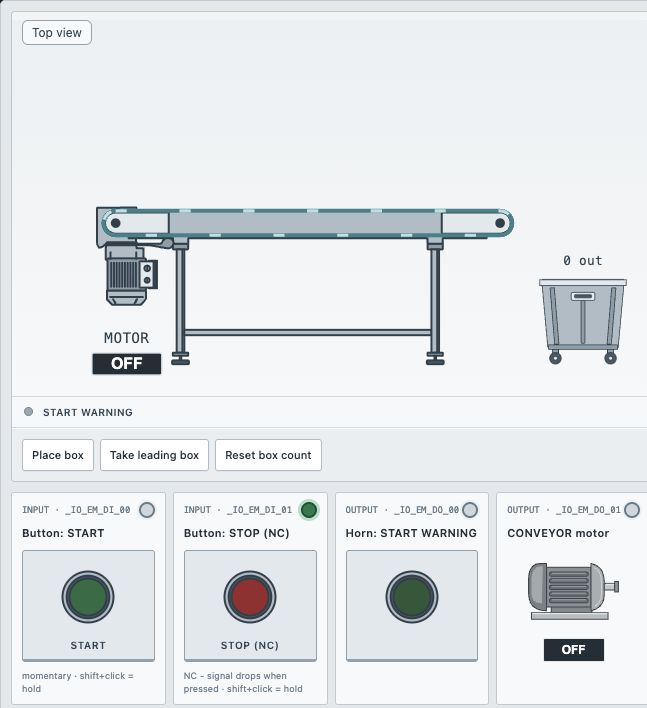
The course workstation adds a momentary START button, an NC STOP button, a warning horn and a conveyor. Its delay is five seconds, not the three-second sandbox example. START must create a maintained run request, so releasing the button does not reset the timer.
There are three phases: idle, waiting and running. During waiting the warning is on and the motor is off. When the delay completes, the motor starts and the warning turns off. STOP cancels the request in either active phase. A later START must begin a fresh full delay.
Check the boundaries
| Situation | Warning | Motor |
|---|---|---|
| No run request | OFF | OFF |
| Request active, less than 5 seconds elapsed | ON | OFF |
| Full delay completed, request still active | OFF | ON |
| STOP during waiting or running | OFF | OFF |
Also repeat START during the waiting period: it must not move the deadline. Cancel partway through, restart, and confirm that the earlier elapsed time is not carried into the new attempt. The automatic checks are more useful for the exact boundary than judging a stopwatch by eye.
Why the timer appears not to work
- Timing the raw START button: releasing the momentary input resets TON before it finishes.
- Driving the motor from the request: the conveyor starts immediately and bypasses the delay.
- Resetting on every START press: this changes the deadline, contrary to the specification.
- Using TOF: an off-delay holds an output after its input turns off; it does not provide this delayed-start behavior.
Learn the seal-in principle first if the maintained request is unfamiliar. The full timed conveyor solution and its task-specific checks are available in the course exercise.
Put the explanation into practice
Public tutorial. The linked exercise requires sign-in and eligible course access.
Practice in simulator ↗Ready for the next step?
Develop your ladder logic skills in TIA Portal, from basic conditions to more complete control programs.
Siemens S7-1200/1500 LAD/FBD course ↗
Looking for a broader path? Explore PLC Bootcamp or compare PLC courses by platform and level.
Check the selected offer for its syllabus, software requirements and simulator access conditions.